

MX Player
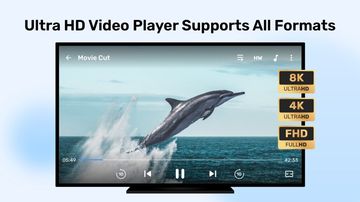
MX Player is a powerful and easy-to-use video and music player for Android devices.
AppKhanaPreview



About this app
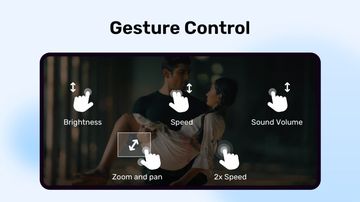
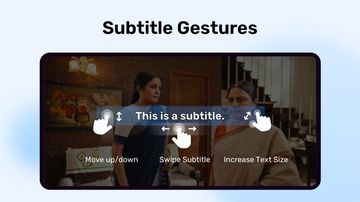
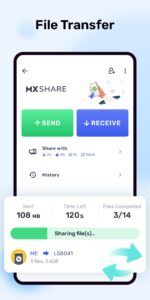
# MX Player 3.3.1 – Video & Music Player for Android **App Name:** MX Player **Version:** 3.3.1 **Category:** Video Players & Editors **Platform:** Android ## About MX Player MX Player is a powerful and easy-to-use video and music player for Android devices. It offers advanced hardware acceleration, multi-core decoding, subtitle support, and convenient playback controls for a smooth entertainment experience. Whether you want to watch movies, play videos, listen to music, or enjoy content with subtitles, MX Player provides a wide range of features to enhance your viewing experience. With support for multiple video formats, customizable playback settings, and privacy features, MX Player is a popular choice for Android users. ## Key Features of MX Player ### 1. Advanced Hardware Acceleration - Enjoy smooth video playback using hardware acceleration. - Support for HW+ decoding on compatible devices. - Improve video performance and playback efficiency. - Play high-quality videos with optimized hardware support. ### 2. Multi-Core Decoding - Take advantage of multi-core processors for better video performance. - Improve playback efficiency on supported Android devices. - Experience smoother playback of demanding video files. ### 3. Zoom and Playback Controls - Pinch the screen to zoom in and out while watching videos. - Swipe to adjust the viewing position. - Use Zoom and Pan controls to customize video display. - Enjoy convenient touch-based playback controls. ### 4. Advanced Subtitle Support - Watch videos with subtitles in multiple formats. - Adjust subtitle size and position. - Swipe forward or backward to navigate subtitle lines. - Move subtitles up or down using gestures. - Customize subtitle appearance for comfortable viewing. ### 5. Private Folder - Keep selected personal videos in a private folder. - Organize media files you want to keep separate. - Protect access to private content using available privacy features. ### 6. Kids Lock - Enable Kids Lock to help prevent accidental screen interactions. - Reduce the chance of children switching to other applications. - Enjoy a more controlled video-watching experience. ### 7. Local Media Playback - Play videos and supported audio files stored on your Android device. - Browse and organize local media files. - Access saved movies, music, and videos. - Control playback with an easy-to-use interface. ## Supported Subtitle Formats MX Player supports a wide range of subtitle formats, including: - **SubRip:** `.srt` - **SubStation Alpha:** `.ssa` - **Advanced SubStation Alpha:** `.ass` - **SAMI:** `.smi` - **MicroDVD:** `.sub` - **VobSub:** `.sub/.idx` - **SubViewer 2.0:** `.sub` - **MPL2:** `.mpl` - **TMPlayer:** `.txt` - **PJS:** `.pjs` - **WebVTT:** `.vtt` - DVD and DVB subtitle tracks - Teletext subtitles Subtitle availability and compatibility may depend on the video format and device. ## App Permissions MX Player may request certain permissions to provide media playback and additional features. ### Storage and File Access **Storage / All Files Access** Allows MX Player to find, organize, and play media files and subtitles stored on your device. ### File Transfer Permissions The following permissions may be requested when using the file transfer feature: **Camera** - Scan QR codes to establish file transfer connections. **Location and Nearby Devices** - Discover nearby devices using Wi-Fi and Bluetooth. - Connect with compatible devices for local file transfer. **Modify System Settings** - Assist with Wi-Fi, Bluetooth, and peer-to-peer connections. These permissions are related to file transfer functionality and may not be required for basic media playback. ### Optional Permissions **Notifications** - Display playback controls and file transfer progress. **Display Over Other Apps** - Enable supported Picture-in-Picture (PIP) playback controls. **Phone** - Help autofill a mobile number during registration or login in supported regions. ## Why C
Information
- Developer
- AppKhana
- Category
- Tools
- Size
- 16 MB
- Version
- 1.9.24
- Updated
- Oct 17, 2026
SHA-256: b6f7cb66d72c86d0abd47c7f9eb6da6ea636273f3682826d4901e96ddf6f2bfd