

CapCut
CapCut is a powerful, all-in-one video editing application designed to help users create professional, creative.
AppKhanaPreview





About this app
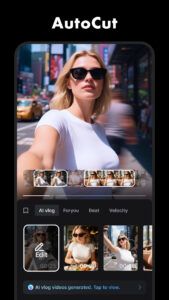
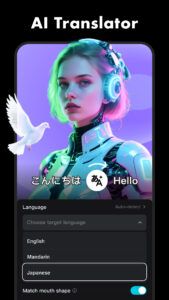
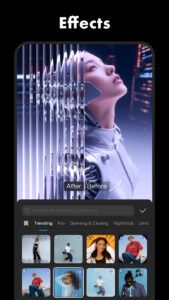
## About CapCut CapCut is a powerful, all-in-one video editing application designed to help users create professional, creative, and high-quality videos with ease. Whether you're a beginner or an experienced content creator, CapCut provides a wide range of tools for editing, enhancing, and sharing videos. From basic video trimming and transitions to advanced animation, intelligent editing tools, and visual effects, CapCut makes video production simple and accessible. ## Key Features ### Basic Video Editing - Trim, cut, split, and merge video clips easily. - Adjust video speed from 0.1x to 100x. - Create smooth speed transitions using customizable speed curves. - Add dynamic zoom-in and zoom-out animations. - Highlight important moments with freeze-frame effects. - Apply creative transitions between video clips. ### Advanced Video Editing - Use keyframe animation to control movement, scale, and other video properties. - Create smooth slow-motion effects with optical flow technology. - Remove selected background colors using chroma key. - Organize video, audio, and other elements on a multi-track timeline. - Stabilize shaky video footage for smoother results. - Fine-tune video sequences with advanced editing controls. ### AI-Powered Editing Tools - **Auto Captions:** Automatically generate subtitles using speech recognition. - **Text-to-Speech:** Convert written text into spoken audio using available voices and languages. - **Background Removal:** Remove video backgrounds automatically. - **Motion Tracking:** Track moving subjects and apply creative effects. ### Text, Titles & Stickers - Add customizable text, titles, and stickers. - Choose from various fonts, colors, and text styles. - Use creative text templates for engaging video content. - Import supported custom fonts. - Adjust subtitle timing, position, and appearance directly on the timeline. ### Effects & Filters - Explore a wide selection of visual effects and filters. - Apply popular effects such as Glitch, Blur, and 3D. - Enhance videos with cinematic-style filters. - Adjust brightness, contrast, saturation, and other visual settings. - Discover regularly updated creative effects. ### Music & Sound Effects - Add background music and sound effects to videos. - Choose from available audio tracks and sound libraries. - Extract audio from existing video clips. - Combine voice recordings, music, and sound effects. - Adjust audio timing to match video scenes. ### Export & Sharing - Export videos in high-definition quality. - Support for up to 4K resolution and 60 FPS on compatible devices. - Enhance supported videos with Smart HDR. - Customize video resolution and export settings. - Create videos for TikTok, Instagram, YouTube, Facebook, and other social media platforms. - Save and share finished videos easily. ## Why Choose CapCut? CapCut combines essential video editing tools with advanced creative features in one easy-to-use application. Its intuitive interface helps beginners get started quickly while offering powerful controls for experienced editors. Whether you're creating short social media videos, educational content, personal projects, or professional presentations, CapCut provides the tools needed to bring your ideas to life. ## App Information **App Name:** CapCut – Video Editor **Version:** 19.7.0 **Developer:** Bytedance Pte. Ltd. **Category:** Video Players & Editors **Platform:** Android ## Official Resources **Official Website:** https://www.capcut.com **Privacy Policy:** https://www.capcut.net/clause/privacy **Terms of Service:** https://www.capcut.com/clause/terms-of-service **Support Email:** capcut.support@bytedance.com ## Create Amazing Videos with CapCut Bring your creativity to life with powerful editing tools, dynamic effects, smooth transitions, and intelligent features. CapCut helps you turn everyday moments into engaging, high-quality videos ready to share with the world.
Information
- Developer
- AppKhana
- Category
- Tools
- Size
- 162 MB
- Version
- 8.6.0
- Updated
- Oct 17, 2026
SHA-256: 23a62a691570facf65ccd0b79c152aee919ded098b7c886639419d39529e6693